EPM
How to Choose School Fee Billing Software: 9 Workflow Checks for Finance Teams
A neutral evaluation guide that follows the full fee workflow, from fee setup to payment matching and reporting, so you can compare vendors on the same checks.
November 9, 2026
Quick Answer
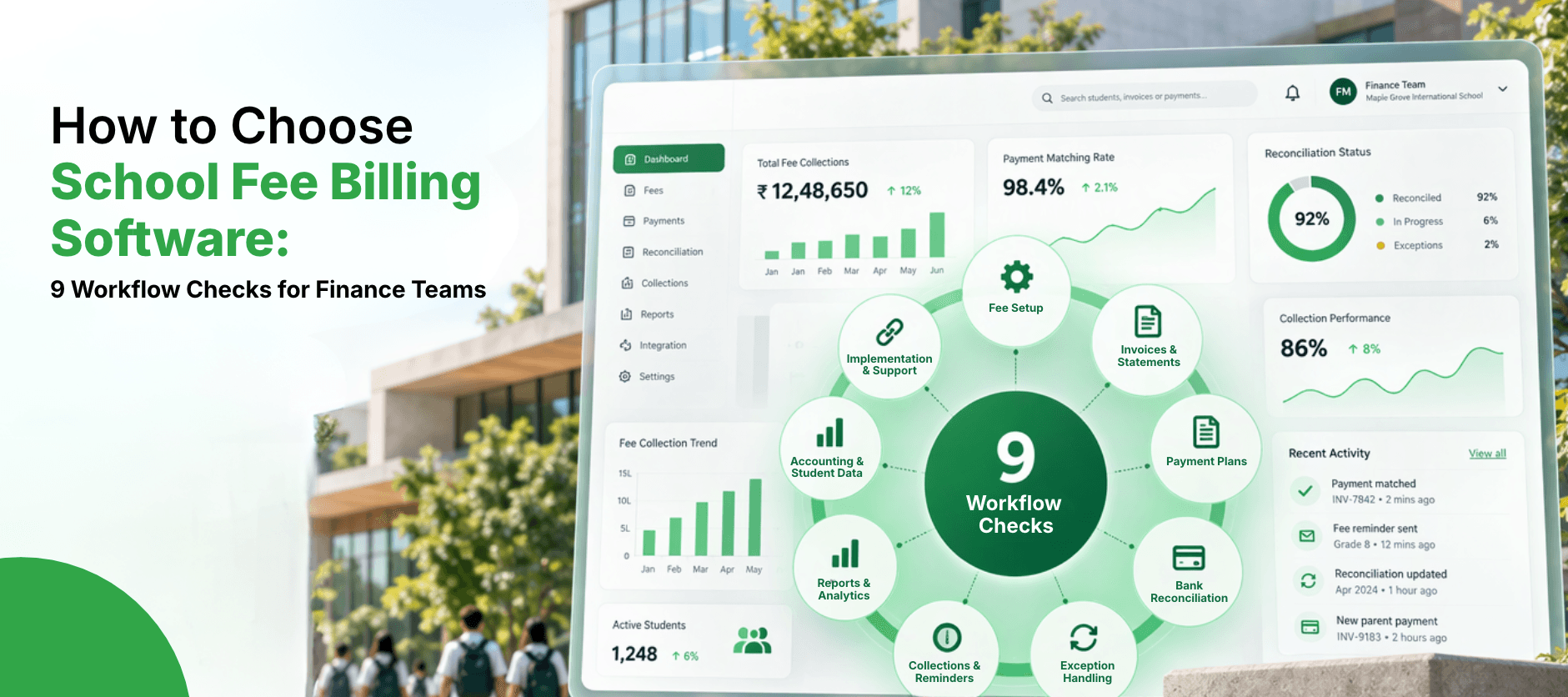
Before choosing school fee billing software, check nine parts of the workflow: fee setup and billing rules, invoices and statements, payment methods and plans, gateway and bank matching, exception handling, overdue reminders, reports, accounting integration, and controls with implementation and support. Evaluate each against your own real scenarios, including your awkward exceptions, and score every vendor on the same checks. A good fee management system handles the whole flow from fee setup to a reconciled ledger, not only the invoice.
Key Takeaways
- Evaluate the full workflow, because a tool that invoices well can still leave a lot of manual matching behind.
- Test with your own scenarios and exceptions, not a standard demo script.
- Score every vendor on the same nine checks, and keep a written record of your requirements.
The shortlist has three vendors, and all three demos looked polished. Each showed an invoice being created, a payment arriving and a report appearing. The finance team leaves the third demo with a nagging feeling: nobody showed what happens when a payment covers two children, a family changes plan mid-year, or the gateway total doesn't match the bank.
Those are the moments that decide whether fee billing software saves time or simply moves the work. This guide gives you nine workflow checks to bring to any vendor, so the evaluation is about your real process and not the demo.
What Should Schools Check Before Choosing Fee Billing Software?
Work through the checks in the order the fee workflow runs. For each one, ask the questions and ask the vendor to show evidence:
| Check | Questions to Ask | Evidence to Request |
|---|---|---|
| 1. Fee setup and billing rules | Can it handle fees by year level, fee categories, sibling and staff discounts, scholarships, bursaries and mid-year joiners or leavers? | A demo using your own fee structure. |
| 2. Invoices and statements | Can it bill per family or per student, issue statements, and send invoices in the formats and on the schedule you need? | Sample invoices and statements. |
| 3. Payment methods and plans | Does it support the payment methods families use, including instalments, direct debit and online payment? | A list of supported methods and a plan setup demo. |
| 4. Gateway and bank matching | How are payments matched to invoices, and how does it handle payment gateway reconciliation against bank records? | A walk-through with real references. |
| 5. Exception handling | What happens with a missing reference, a split payment, a part-payment, a duplicate or a refund? | A demo of each exception from your own list. |
| 6. Overdue reminders and collections | Can reminders be scheduled, tailored and tracked, and can payment arrangements be recorded? | Sample reminder rules and a collections view. |
| 7. Reports | Does it provide receivables ageing, collection rates, fee income by type and reports for the Executive and Board? | A set of standard reports and a custom report example. |
| 8. Accounting integration and student data | How does it post to the ledger, use your chart of accounts and exchange data with the student system? | An integration description and a posting example. |
| 9. Controls, implementation and support | What permissions and audit trail are provided, and how are data migration, training and support handled? | A written implementation plan and references. |
How Do You Compare Vendors Fairly?
- Write your requirements first: list what you need under each of the nine checks, and mark which are must-haves.
- Prepare real scenarios: take them from your own exceptions, such as a split payment or a mid-year change of plan.
- Ask every vendor the same questions: so the answers can be compared side by side.
- Score each check: for example 0 for not supported, 1 for partly, and 2 for fully, and weight the must-haves.
- Ask to see it with your data: a demo with your own fee structure tells you much more than a standard one.
- Check references: speak to schools with a similar size and fee structure.
Why Is Evaluating Fee Billing Software So Hard?
Because demos show the happy path. The difficult part of fee management is the exceptions, and they are rarely shown unless you ask. Meanwhile the finance team has to evaluate software on top of running month end, and the people who know the awkward cases are the same people who are busy reconciling them.
None of this reflects a lack of diligence. It reflects how much of the real work sits outside the standard demo, which is why a written checklist and your own scenarios are worth the effort.
What Should Reports and Accounting Integration Cover?
Two checks deserve extra attention because they decide how much manual work remains. Reports should give the finance team and the Executive a clear view of receivables ageing, collection rates and fee income by type, without exporting to a spreadsheet to build them.
Accounting integration should post fee income and receipts to the ledger in the structure you already use. If it requires re-keying or manual journals, the time saved in billing can be lost in finance.
Now Imagine the Version That Works
Imagine an evaluation where every vendor answered the same nine checks, using your own exceptions, and the scores sat in one document that the whole team had reviewed. The decision rests on evidence, and the requirements list becomes the starting point for implementation.
TENOR, Feoda's fee billing, payments and receivables product built on Oracle NetSuite, is one option to consider. Use the checklist on us as well. If you would like to see whether TENOR fits your fee billing and reconciliation workflow, bring your real scenarios and we'll walk through them.
Frequently Asked Questions
Check nine areas: fee setup and billing rules, invoices and statements, payment methods and plans, gateway and bank matching, exception handling, overdue reminders, reports, accounting integration, and controls, implementation and support.
Related Articles
- ERPA Practical School Financial Reforecasting Method for Changes in Enrolment
- ERPHow to Calculate the Time and Cost of Manual School Fee Reconciliation
- ERPHow to Improve School Enrolment Forecasting: 5 Inputs Finance Teams Should Track
- ERPWhy Does the Mid-Year Reforecast Feel Like Starting the Budget Over Again?
- ERPWhat Does a School Board Actually Ask Before Approving Next Year's Budget?

- ERPHow Long Does It Typically Take to Implement Oracle NetSuite for a School or University?
- ERPWhat Is a Finance System, and Does a School or University Actually Need One?
- School BudgetingHow Do Schools Forecast Tuition Revenue? A Practical Guide for Finance Teams